Mirrors
Automatic mirroring
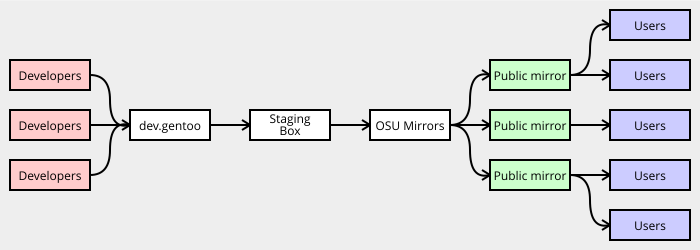
Packages will automatically have their SRC_URI components mirrored onto
Gentoo mirrors, including those hosted on the official Gentoo
Infrastructure (i.e. developer space at dev.gentoo.org). When
fetching, package manager checks
Gentoo mirrors first before trying the original upstream location.
This is generally desired behaviour — upstream mirrors are prone to being rearranged, tidied out or having files modified.
Restricting automatic mirroring
Three RESTRICT keywords can be used to control the mirroring process.
The RESTRICT="mirror" setting should be used if we cannot legally mirror
certain files; files will still be downloaded from the original locations.
The RESTRICT="primaryuri" setting causes Portage to try
original locations first, and then fall back to mirrors if necessary.
This should not be used in new ebuilds.
There is also RESTRICT="fetch", which prevents Portage from trying to
fetch anything manually.
The pkg_nofetch
function will be called if any SRC_URI components cannot be found.
This should only be used if a license requires it.
Replacing automatically mirrored files
On rare occasions you may need to replace a file that is already mirrored.
This is usually the case when upstream remakes a release package. If this
is necessary, please use SRC_URI arrow to rename the file. For example:
# upstream updated the distfile in place, so suffix it with _YYYYMMDD
SRC_URI="https://example.com/badupstream/${P}.tar.gz -> ${P}_20191016.tar.gz"
Since Gentoo mirrors operate using local distfile names, they will automatically fetch and start distributing the new version.
Updating an existing distfile is generally cause for concern and must be done with care, see Updating Manifest files.
More general information about the internals of mirroring can be found on Infrastructure project's Distfile Mirroring System page.
Suitable download hosts
If you have to host a source file (patch or tarball) yourself, as long as it
can be freely distributed (by license and legality), you're suggested to use
your developer's space at dev.gentoo.org. Since external overlays may
depend on your patches/tarballs, using the dev space at dev.gentoo.org
keeps the distfiles at a stable and reliable infrastructure. If you retire,
other developers can take over your distfiles and place them into their own
devspace.
Previous policy was to use mirror://gentoo directly, but this is now
prohibited, as that wouldn't allow to have long-term availability and
traceability of the source files, which might be a requirement of the license.
When you upload the distfile to dev.gentoo.org:~/public_html, ensure that
your file and its parent directories have the correct permissions, so they're
accessible. An example SRC_URI referencing a distfile mirrored this way
is as follows:
SRC_URI="https://dev.gentoo.org/~myname/distfiles/${P}.tar.gz"
where myname refers to the username of the developer.
If the upstream download location for a package uses a non-standard TCP port (anything other than 21, 80 or 443), you must manually mirror the files. Not doing so can cause all kinds of problems with strict firewalls.
Third-party mirrors
Usage of third-party mirrors and the mirror://
pseudo-protocol is described in the
SRC_URI
variable documentation.